
Getting Started with Business Units
Overview
The Business Unit feature lets a client support multiple brands or subsidiaries within a single Loyalty platform environment. Each Business Unit operates as an independent entity within the platform, while still providing corporate-level visibility into the entire organization.
Note: Business Units are an optional feature that must be enabled in your Loyalty account. Speak with your Zeta team for more information on enabling this feature.
At a User Account level, individuals can be assigned to one or more Business Units. When working within Loyalty, the user can pick from among the set of Business Units to which they have been assigned. This selection, referred to as the Business Unit context, controls what this user sees, and the Members and data they can access.
If a User Account has been assigned to multiple Business Units, that user can switch their Business Unit context using the menu in the top-right corner of any Loyalty screen.
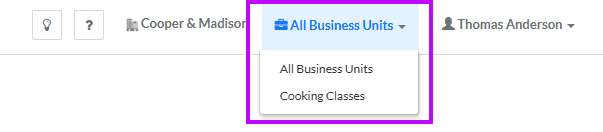
In addition, if a User Account has been designated as a "Corporate" user, they have the option to select "All Business Units" as their context. A corporate-level marketer who is working in the "All Business Units" context can view and access Members and data across the entire organization.
For more information on assigning User Accounts to Business Units, see Assign a User Account to a Business Unit.
At a database level, the Business Unit feature enables a client's marketing team to create a single unified Member database across all Business Units. Member Attributes that are shared across Business Units maintain a single instance of the Attribute value that is shared by everyone. For example, you could have a common "lifetime purchase" Member Attribute that shows a Member's total spend across all Business Units.
Conversely, you can also designate a Member Attribute as being "Business Unit specific." If this feature is enabled for a Member Attribute, each Business Unit can populate that Attribute with their own unique value. For example, you could have a "subscribed" Attribute that stores separate values per Business Unit, thereby allowing a Member to opt-in / opt-out of receiving marketing emails at a brand level.
For more information on configuring Member Attributes, see Getting Started with Member Attributes.
A single row (i.e., a Member) within the Member table can optionally be shared with one or more Business Units. For example, let's say you use Business Units to define three different brands. A Member can sign up in one, two, or all three of your brands, but still have only a single record within the Member table. A marketer working within the context of a single Business Unit will be able to access only the Members who have signed up for that brand.
Using Business Units
Business Units are relevant when working with the Loyalty asset types described below.
Members
The Members screen and the People screen are used to search for Member Profiles. These two screens display all the Members in your current Business Unit context. Other Members associated with other Business Units will appear on these screens, but all the Member Profile data (except for their Member ID) will be obscured. In addition, you can't view the Member Profile screen or the Member Details screen for Members who are not in your current Business Unit context.
When viewing the Member Profile screen or the Member Details screen for a Member in your Business Unit context, the Profile tab of both screens displays all the Member Attribute values for the selected Member Profile. If you have Member Attributes designated as "Business Unit-Specific," these Attributes are displayed in a separate section of the Profile tab called BU-Specific Member Attributes. This section displays the values for these Attributes for your currently selected Business Unit context. If you select a different Business Unit context, the values in this section will be updated to reflect the new context.
Segments
Segments allow you to select Members based on logical conditions. Segments are associated with a Business Unit, so the Segments screen displays only the Segments in your current Business Unit context.
When you create a Segment, the platform automatically assigns it to your current Business Unit context. Likewise, if you are a corporate user working in the "All Business Units" context, a new Segment will be assigned to all Business Units. You can always change a Segment to any other Business Unit to which you have access (see Edit Segment Properties for more information).
When you execute a Segment, the platform selects the Members who meet the Segment's logical conditions. The platform will select only Members that are associated with the Segment's assigned Business Unit.
Activities
Activities refer to Member behaviors or transactions that are captured and tracked by Loyalty, such as enrollments, purchases, coupon redemptions, and so forth. Activity information is received by Loyalty typically through either an API request or an import from some other platform or system. The Business Unit associated with that Activity should be included as part of the API or import.
Analytics
Loyalty provides a set of sophisticated reports and dashboards designed to help marketers track the reach and effectiveness of their marketing strategy. When viewing a reporting Dashboard, the platform filters the data used to populate the reports based on your currently selected Business Unit context. If you select a different Business Unit context, the report will automatically refresh accordingly.
Order Rules
Order Rules are designed to calculate the Metrics that a Member accrues upon making a purchase. Business Units are required if you intend to use Order Rules.
Access
The Business Units screen is used to view, create, and manage the Business Units in your loyalty program. To access the Business Units screen, select Program from the top navigation bar, then select Business Units from the side navigation menu.
Exports
The platform does not support the export of Business Units.
Imports
The platform does not support the import of Business Units.
Quick Links
 View a Business Unit View a Business Unit |
 Create a Business Unit Create a Business Unit |
 Edit Business Unit Definition Edit Business Unit Definition |
